cognira for Android · free on Google Play
cognira, in your pocket.
Ask anything, map out an idea, and carry on the chats you started on cognira.dev. The same cognira and the same account, wherever you are.
Free to install · Sign in with email, Google, Hugging Face or X
See it work
Teach it once. It remembers.
Tell cognira what to call you, and a new chat already knows. Then one idea opens into a map.
Sound on. Every shot is the real app.
Home
A gentle nudge, never a nag.
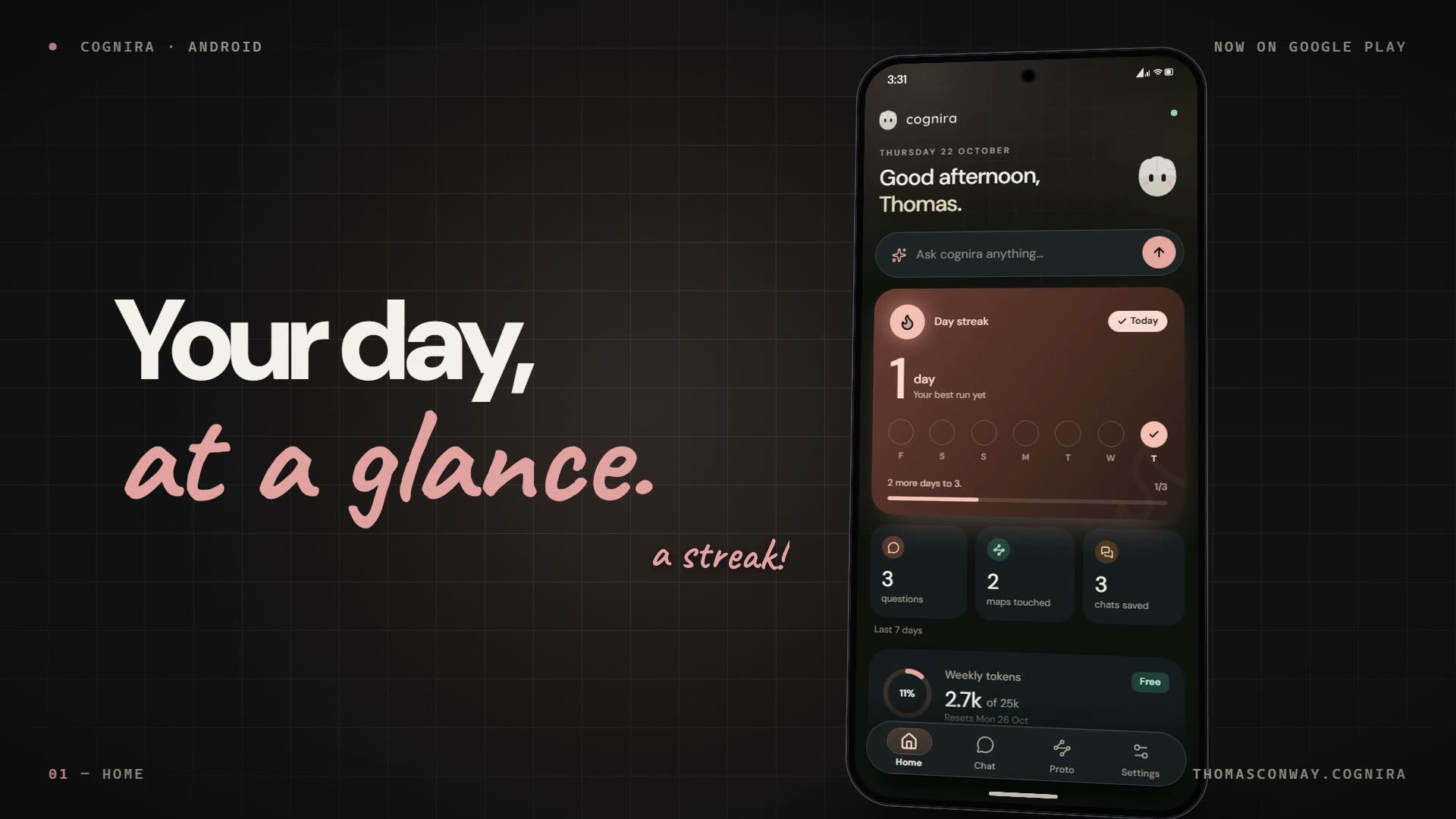
Home is your day at a glance: your streak, this week in numbers, and the chats and maps you were last working on.
Keep a streak going
Ask one thing a day and the flame stays lit. Home shows your last seven days and how close you are to the next milestone.
Don’t lose your streak
You’re on a 12-day streak. Open cognira today to keep it going.
One reminder, at 7pm
Only on days you haven’t used cognira yet, and only if you turn it on. Switch it off in Settings whenever you like.
Your week’s allowance
See how much of your plan’s weekly allowance you’ve used and when it resets. If you need more, Upgrade plan is right there.
Your computer’s tabs, on your phone
Turn on phone sync in exceeder, cognira’s browser, and the pages open on your computer show up on Home. Copy a link on your phone and send it the other way.
Meet exceederChat
Ask anything. Hear it back.
Replies appear as they’re written, with lists, headings and code laid out properly. Tap the speaker and your phone reads the answer aloud.
- See how it got thereOpen the thinking behind any answer, step by step.
- See what it rememberedEach reply shows the memories it used, and you can make it forget one.
- Carry on anywhereA chat you started on cognira.dev picks up here, and the other way round.
- Say what helpedThumbs up or down, saved with the reply on your account.
Proto
One sentence. A whole map.
Type an idea and Proto spreads it out into a map of cards. Pinch and pan around it, tap a card to grow a new branch, or switch to the outline to read it top to bottom. If an idea is a little thin, Proto asks you a quick question first.
- Your maps, everywhereMaps you made on cognira.dev are already here, and new ones save to your account.
- Edit as you goTap any card to change its words, or to grow branches from it.
Robotics
Drive your robot from anywhere.
Built a robot with the cognira Robotics kit? While it’s switched on, a Robotics tab appears in the app with its buttons, sliders and joystick, ready to use.
- A Stop button, alwaysIt sits at the top of the screen and works the moment you tap it.
- Watch it liveReadings like battery or distance update as the robot runs.
No robot? The tab stays out of the way. See how the Robotics kit works
Settings
One account. Every screen.
cognira on your phone is the cognira you already know. Sign in once and everything is where you left it.
Sign in your way
Use the email on your account, or Google, Hugging Face or X. A new phone may ask for a quick code by email, text or authenticator app.
The same plan
Free, Pro and Max all talk to the same cognira. Your plan sets how much you can ask each week.
See plansMake it yours
Switches for haptics, reading every reply aloud and the 7pm reminder, all in Settings.
New to cognira? Make a free account on cognira.dev, then sign in on your phone.
Is it the same account as the website?
Yes. Sign in with the email you use on cognira.dev, or with Google, Hugging Face or X. Your chats, maps and plan come with you, and anything you do on your phone is there the next time you open the website.
How much does it cost?
The app is free to install. Chats and maps use your plan’s weekly allowance, on Free, Pro or Max, and every plan talks to the same cognira.
Will it slow my phone down or drain the battery?
It shouldn’t. cognira does its thinking on cognira’s own servers rather than on your phone, so the app itself stays light. You’ll need an internet connection to use it.
Will it send me notifications?
Only the ones you allow: a 7pm reminder on days you haven’t used cognira yet, to keep your streak going, and any page you send to your phone from exceeder on your computer. Switch the reminder off in Settings whenever you like.
Do I need a robot?
Not at all. The Robotics tab only appears while a robot you have set up is switched on. Without one, the app is Home, Chat, Proto and Settings.
How do I make an account?
Create a free account on cognira.dev, then sign in on the app with the same details. It takes about a minute.
From the blog
More about the app
- Productcognira for Android is on Google PlayRead
- How-toA chat you started on the web continues on the phoneRead
- How-toHave the phone read a replyRead
- LearningSee what a reply remembered, then forget itRead
- ProductMap an idea from your phoneRead
- RoboticsDrive a robot from your phoneRead
- How-toOne nudge at 7pm, and only if the day is still emptyRead
- How-toThe tabs open on your computer, listed on your phoneRead
Take cognira with you.
Free on Google Play. Sign in with the account you already have, or make one in a minute.